





















/Wacom%20Intuos%20Pro%20Creative%20Pen%20Tablet%20(Large).1-190x190w.webp "Wacom Intuos Pro PTH-860N (Large, Black)")










-190x190.webp "XPPen Artist Pro 22 (Gen2) Drawing Display - QHD")

















-190x190.webp "Huion USB-C to USB-C Cable (UC06A)")




-190x190.webp "XPPen Pen nibs for X3 Pro Slim Stylus (ACTPD51A) - pack of 5")
-190x190.webp "XPPen Pen Felt nibs for X3 Pro Slim Stylus (ACTPD51B) - pack of 5")


-190x190w.webp "XPPen Felt Nibs (ACTPH10B) - pack of 5")







%20Artist%2015.6%20pro/AC91-190x190w.webp "XPPen Protective Film for Artist 15.6 Pro V2")











/Screen%20Protector%20for%20Wacom%20Cintiq%2016%20(2-Pack)-190x190h.webp "BoxWave Screen Protector for Wacom Cintiq 16 (2-Pack)")

%20for%20Wacom%20One%20Standard%20Pen%20-%2010%20pcs-190x190w.webp "Wacom Pen Nibs Elastomer (black) for Wacom One Standard Pen - 10 pcs - ACK24918Z")





-190x190.webp "XPPen X3 Elite Stylus Without eraser - PH10B")
Artist%2013.3%20Pro/ESRAC81-190x190.webp "XPPen AC81 Screen Protector Only For Artist 13.3 Pro")





%20for%20Wacom%20One%20Standard%20Pen-190x190w.webp "Wacom Pen Nibs Felt (black) for Wacom One Standard Pen")


keyboard-B-190x190w.webp "Arteck HB192 Bluetooth Keyboard")


- Stock: Out Of Stock
- Brand: Huion
- Model: H580X
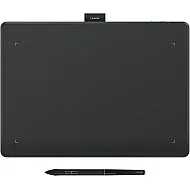
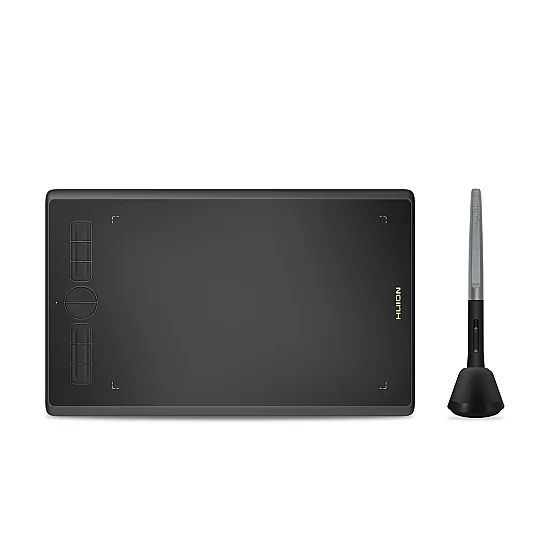
Inspiroy H580X
Help Online Education Be More Natural
Steady, convenient, and durable. Inspiroy H580X can compatible
with various operating systems like ChromeOS, macOS, and windows for convenient
e-learning and online meeting. It is also equipped with 8 shortcut keys for you
to easily use in class or meetings.
Assist You in Better Online Communication
With the compatibility of various operating systems and 8
shortcut keys, Inspiroy H580X can ensure fluent operation when you in class or
meetings. You can also replace your mouse with the battery-free pen in mouse
mode, which can help you reduce the risk of tenosynovitis.
Simplify Design for Better Comfort
The ergonomically designed narrow frame palm rest area and
rounded corners ensure that hands do not get fatigued after prolonged writing
notes on PowerPoint. Also, the 8 shortcut keys can be customized as your common
functions like mute audio, start/stop screen sharing, start/stop recording, and
so on.
A Paper-like Surface
The matte surface cover of Inspiroy H580X can provide you a
natural pen-on-paper drawing experience. In addition, it has a full cover panel
design colored with gold and black to let your workspace tidier, which is
suitable for a variety of places to use.
Keep the Inspiration in Your Hand
Inspiroy H580X is also suitable for beginners to learn
drawing and design, the standard 8192 pressure sensitivity and 5080LPI pen
resolution of battery-free pen PW100 are enough to meet most artist's demands
on design, paint, and creation. It is also equipped with ±60° Tilt Function to
make it more like a real pen. So try to create your artworks now, even if you
have never tried digital drawing.
Four Operating Systems Supported
Inspiroy H580X can compatible with multiple operating
systems such as Windows, macOS, and ChromeOS, you can use it smoothly on almost
any laptop or desktop. Besides, the Android Phone or Tablet is also supported
by the H580X for easy use at anywhere.
Easy to Carry
Convenient to Use
With only 343g weight and 8mm thickness, Inspiroy H580X has
great portability. You can easily put it into your bag to bring anywhere.
Find the Best Angle for You
The rotation angle of the tablet working area can be set in
the driver to adapt to various application scenarios. After setting the working
area, you can rotate the tablet to 180° if you are left-handed, or rotate it to
90° / 270° to let the working area fit for your portrait monitor.
Connectivity & Compatibility
Windows 7 or later, macOS 10.12 or later, ChromeOS 88 or
later and Android 6.0 or later
| Technical | |
| Technology | Battery-Free Electromagnetic Resonance |
| Active Area | 203.2 x 127mm (8 x 5inch) |
| Pen Pressure | 8192 Levels |
| Tilt Function | ±60° |
| Reading Height | 10mm |
| Report Rate (Revolutions per Second) | >220PPS |
| Resolution (Lines per Inch) | 5080 |
| Data Communication Interface | USB-C |
| Express Keys | 8 |
| General | |
| Net Weight | 343g |
| Operating Conditions | |
| OS Support | Windows 7 or later, macOS 10.12 or later, ChromeOS 88 or later, Android 6.0 or later |