
















/Wacom%20Intuos%20Pro%20Creative%20Pen%20Tablet%20(Large).1-190x190w.webp "Wacom Intuos Pro PTH-860N (Large, Black)")




























-190x190.webp "Huion USB-C to USB-C Cable (UC06A)")












%20Artist%2015.6%20pro/AC91-190x190w.webp "XPPen Protective Film for Artist 15.6 Pro V2")






-190x190.webp "XPPen X3 Elite Stylus Without eraser - PH10B")





/Screen%20Protector%20for%20Wacom%20Cintiq%2016%20(2-Pack)-190x190h.webp "BoxWave Screen Protector for Wacom Cintiq 16 (2-Pack)")







Artist%2013.3%20Pro/ESRAC81-190x190.webp "XPPen AC81 Screen Protector Only For Artist 13.3 Pro")




keyboard-B-190x190w.webp "Arteck HB192 Bluetooth Keyboard")






Brought by

- Stock: Pre-Order
- Brand: Wacom
- Model: DTH167
Available Options
Wacom Cintiq pro 16
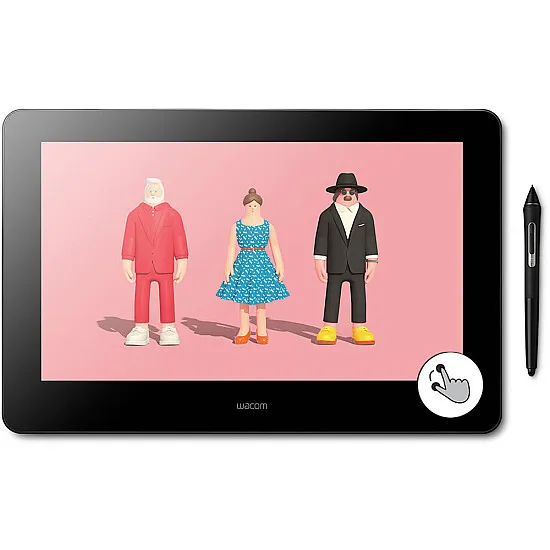
Accuracy redefined in a compact design
When creativity strikes, you want to bring your vision to life effortlessly. That’s why we’ve refined Wacom Cintiq Pro 16 to make it even more comfortable and natural to work on. With enhanced ergonomics and an intuitive pen-on-screen experience, you can fully immerse yourself in your craft.
Live. Dare. Create.
Improved by you
After listening to feedback from our customers, we’ve enhanced Wacom Cintiq Pro 16 to help boost your creative output.
ExpressKeys™
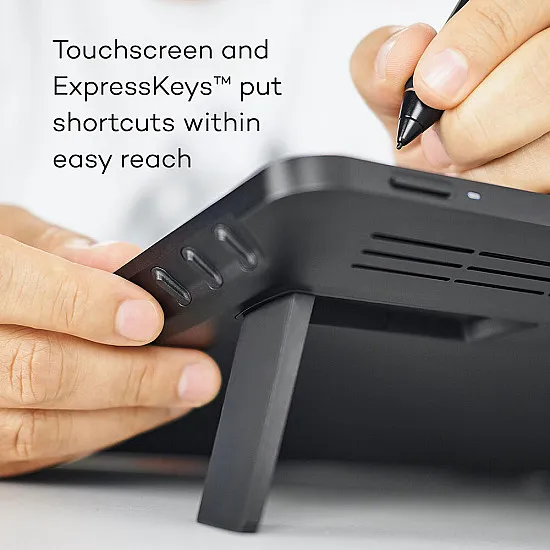
Time-saving ExpressKeys™
Our new physical ExpressKeys™ are now positioned at the rear edge of the display, so there’s no compromise on screen size when you’re getting to work on your canvas. Designed for more efficient working, the ExpressKeys™ help to give you the time you need to add that extra level of polish to every project.
Controls
No unintended touches
To avoid a stray button tap interrupting your workflow, we’ve refined the display to give you greater control. A new button ensures the touch function only switches on/off when you need it. Plus, Enhanced On-Screen Controls gives you even more control of your touch functionality.
Connectivity
Connect and play
Linking Wacom Cintiq Pro 16 to your Mac or Windows PC is effortless.
PC: Windows® 7 or later (Latest service pack/ build)
Mac: macOS 10.14 or later (Latest update)
All you need to do is connect the USB-C* and HDMI cables – whether at your desk or on your lap. And you can rest easy knowing that all the cables are designed sustainably, containing absolutely PVC-free**
* Requires a USB-C port with DisplayPort Alternate Mode. Alternatively Cintiq Pro 16 can be connected to a HDMI and a USB-A port.
The magic inside our technology
Our goal at Wacom has always been to bring people and technology together with natural, intuitive devices that help you make the most of your creativity.
Created for all who want to express ideas, we work with our customers to constantly improve our products in line with their needs. Robust yet refined, advanced yet intuitive, we are proud to provide benchmark creative technology for today and tomorrow.
Find out how our technology works.
Wacom Pen
Press Sense
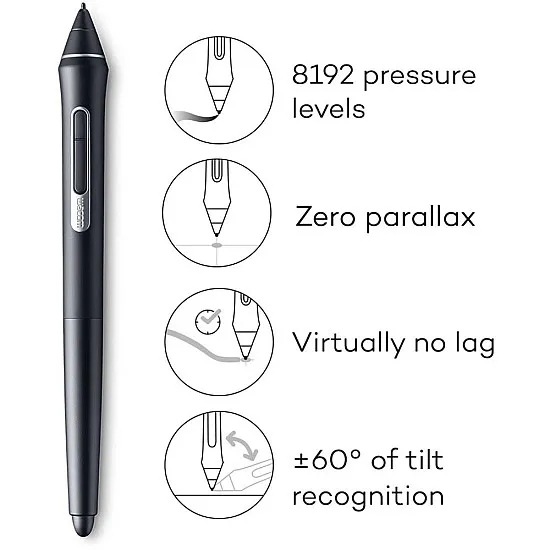
Wacom Pro Pen is sensitive to the way you write and draw and recognizes thick lines, thin lines, and shading.
Tilt Tracker
We’ve created tech that captures your specially angled strokes for comfortable and accurate shading.
Custom Nibs
Wacom’s range of nibs provide the right feel and durability for different kinds of work and creativity – so you can choose the tip that suits your needs the best.
Natural Touch
Writing with a Wacom pen is totally intuitive – like using a traditional pen. And thanks to our cutting-edge technology, it’s intelligent enough to know what the natural weight of your hand feels like for drawing fast and slow, and for shading or any other textural effect.
Battery-Free Pen
Wacom pens are battery-free and lightweight, thanks to Wacom-patented EMR technology. That means they’re comfortable to use over long periods of time.
Wacom Screen
True Point
Pixel-precise alignment between pen tip and drawing point gives the sensation of drawing on paper.
Textured Glass
We’ve coated our glass screens with a special treatment to add friction, which means drawing on your Wacom device feels like drawing on paper.
True Picture
Our industry-leading color displays showcase uniform brightness, high resolution, and true-to-life color quality, making them ideal for every role, from animation to design.
Pixel Perfect
We’ve carefully engineered our screens to avoid parallax – the disconnect between where you expect the cursor to be, and where it actually is – so working with Wacom screens is intuitive and comfortable.
Glare-Free
We’ve treated all our screens with a special reflection-reducing coating to make sure they’re gentle on the eyes and comfortable to work with over long hours.
Wacom Performance
Anti-jitter technology means your lines are clear and smooth.
Anti-Lag
There’s virtually no lag between you moving the pen and what shows up on screen – so it feels like you’re drawing or writing with pen and paper.
"Especially for sculpting and texturing, the stroke needs to sit perfectly on the mesh. With the Cintiq Pro 16, I can place my strokes pixel perfect. The haptic feedback of the new ExpressKeys keeps me focused on my work. No pause when I have to search something on my keyboard."
VBring a natural precision to every pixel
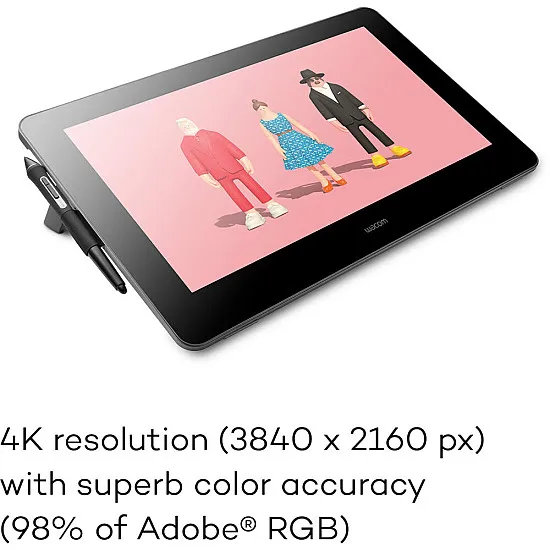
Our anti-glare 4K screen and Pro Pen 2 work in harmony to create a completely natural pen-on-screen experience. Every stroke you make on the screen’s etched glass surface gives you that realistic sensation of pen on paper, while the wide color gamut lets you see your art in perfect detail.
And with built in pressure sensitivity, virtually lag-free tracking and superior tilt capabilities, Wacom Pro Pen 2 not only looks like a pen, it feels like one too.
Great bundled creative apps
Get complimentary software offers with every Cintiq Pro
1-Toon Boom Harmony ( 3 months free )
2-Toon Boom Storyboard Pro ( 3 months free )
3- MASV ( 3 free months) (or 250 GB) )
4-Shapr3D ( 3 months free )
5-Bluescape ( 3 months free )
*To get your 90-day complimentary software you need to sign in with your Wacom ID, respectively create a Wacom ID account with your personal data, and register your device. To begin using the software after installation, registration with Toon Boom is required.
| Monitor | |
| Type | IPS |
| Screen Size | 15.6 in (39.6 cm) |
| Display Area | (13.6 x 7.6 in) 344 x 194 mm |
| Native Resolution | 3840 x 2160 |
| Color gamut | 98% Adobe RGB (CIE 1931) (typ) |
| Number of Colors | 16.7M( 8bit) |
| Aspect Ratio | 16:9 |
| Contrast Ratio | 1000:1 |
| Viewing Angle | 178° |
| Surface | Anti-glare etched glass |
| Full lamination | Yes |
| Brightness | 300 cd/m2 (typ) |
| Technical | |
| Technology | Battery-Free Electromagnetic Resonance |
| Stylus Pen | Wacom Pro Pen 2 |
| Pen Pressure | 8192 levels |
| Tilt Function | ±60° |
| Reading Height | - |
| Resolution (Lines per Inch) | 5080 LPI |
| Accuracy | - |
| eraser | Yes (8192 levels) |
| Express Keys | 8 |
| Roller Wheel | - |
| Touch Shortcut | - |
| Multi-Touch | Yes -10 fingers |
| General | |
| Dimensions/piece | 410 x 266 x 22 mm (16.1 x 10.5 x 0.9 in) |
| Net Weight | 1.9kg |
| Colour | black |
| Material | - |
| Operating Conditions | |
| Power Input | 100 to 240 VAC, 50/60Hz |
| Ports Included | USB-C HDMI |
| Hardware Requirements | USB-C port with DisplayPort HDMI* port and USB-A port |
| OS Support | PC: Windows® 7 or later (Latest service pack/ build) Mac: macOS 10.14 or later (Latest update) |
| What's included & Extras | |
| What's Included | Wacom Cintiq Pro 16 Wacom Pro Pen 2 Pen stand with 10 replacement nibs(6 standard, 4 felt) and nib removal tool Pen holder with 3 replacement nibs (3 standard) 13 Replacement nibs in Pen stand and Pen holder USB-C to USB-C cable (1.0m) USB-C to USB-A cable (1.8m) Premium HDMI cable (1.8m) Power cord (1.0m) Quick Start Guide Regulation sheet AC adaptor(1.2m) Cleaning cloth |
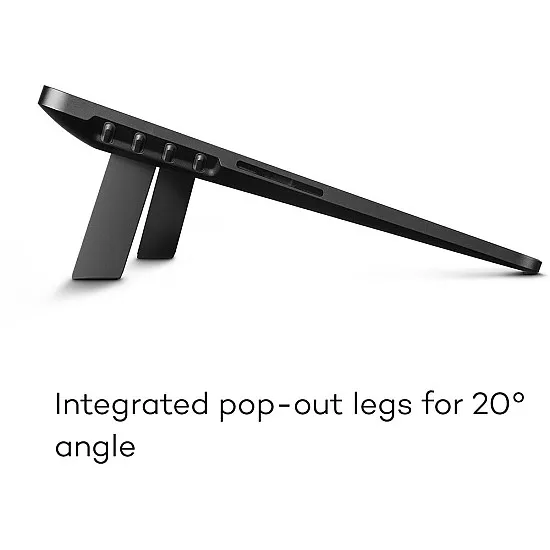
| stand | Foldable legs 19° |
| Warranty | 2 Years |